Deadlines
Deadlines are time-sensitive reminders created to display for one or multiple contacts in the Client Portal. They help users track important dates and actions related to client work. Each deadline can include the following details:
- Name
- Due date
- Owner
- Description
- Client type
If multiple deadlines are created, they can be sorted by name or by the date they were created.
Deadlines for a specific Contact
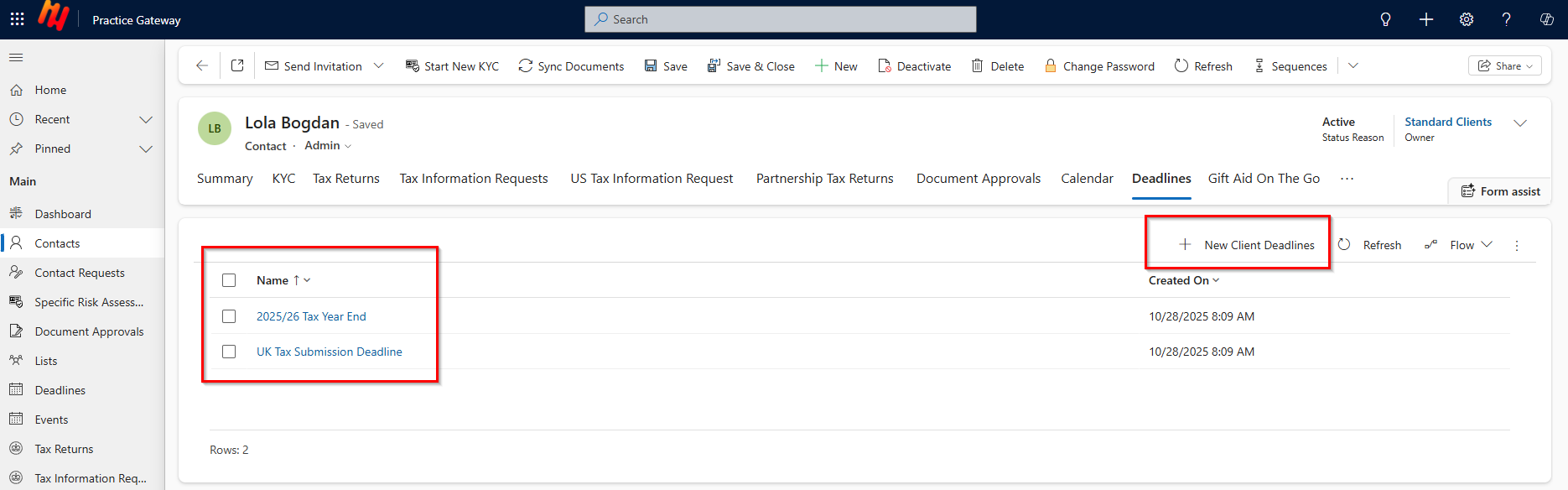
There are Deadlines that can be created directly from the contact’s page in Practice Gateway. These deadlines are unique to the individual client and are managed through the Deadlines tab at the top of the Contact form. Once added, the deadline will appear on the client’s home page dashboard in the portal, making it easy for them to stay informed of upcoming actions or requirements.
How to access:
-
Select a Contact from your contact list and click on Deadlines.

-
In Deadlines press + New Client Deadlines.
- Type Name.
- Type Description.
- Type Contact.
- Insert Due Date.
-
(Optional) In Deadlines press select existing record to adjust or update and follow same steps:
- Type Name.
- Type Description.
- Type Contact.
- Insert Due Date.
-
Press the Save & Close button.
Deadlines for Bulk Contacts
The second type of deadline is managed from the Deadlines section in the left-hand navigation panel. This view provides a system-wide overview and allows you to create deadlines in bulk. You can apply these deadlines to all existing clients or filter by specific client types, depending on your needs. This is especially useful for firm-wide deadlines or recurring compliance dates.